Email Corrections
When email is sent from this site, we are notified of errors and "bounced" messages. When this occurs data used by the "Email Corrections" page is automatically updated. You can use this page to make corrections and view all the relevant data and error reports.
Get there by selecting the toolbox menu, then "EMail"
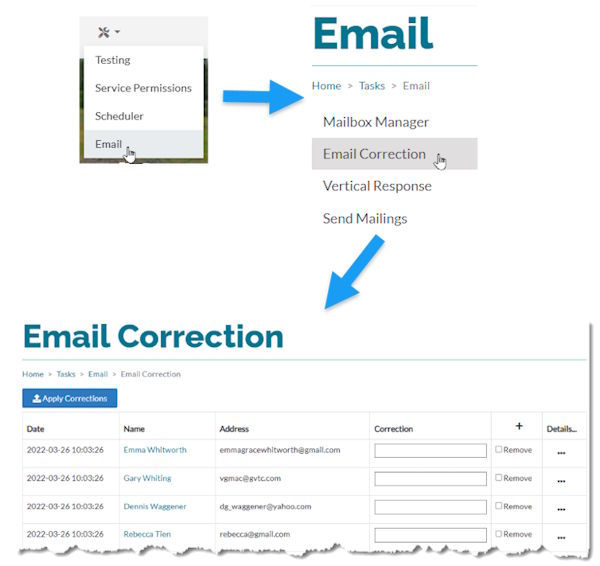
To correct an email address, type the correct email address in the "Corrections" field. If you are convinced that the previous address is valid and won't bounce again, you can copy the address and paste it into the field.
To remove a record from the list, check the "Remove" checkbox. You would want to do this if the person's directory entry has been deleted, or they are deceased,
When you have made as many corrections as you wish and then click the "Apply Corrections" button. The email will be updated and they will be restored to all previously selected email lists.
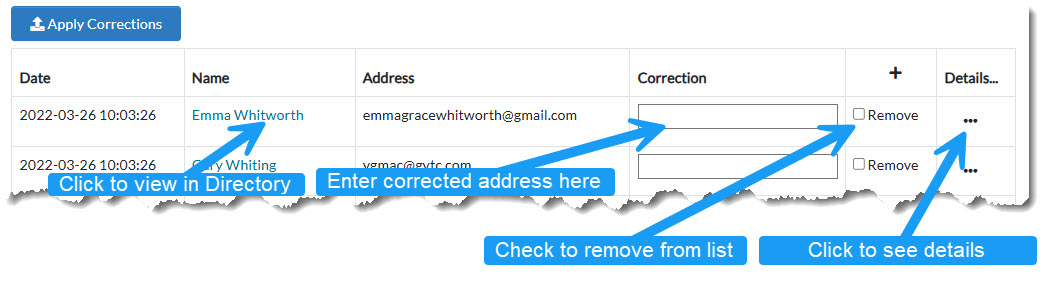
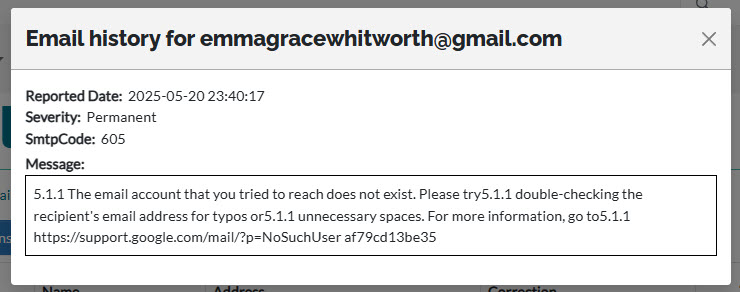
Additionally, if you want to view the details of the email failures log for a selected email address. Click the ellipsis button ('...') on the right. This will display a list of all previously occurring email delivery failures. It looks like this...