Email Accounts
Email Accounts and Forwarders on Scym.org
There are two types of email addresses on scym.org.
- Email accounts are actual mailboxes that that can be accessed from an email client program such as Gmail, Outlook or from your web browser using WebMail.
- Forwarders are "aliases" that simply forward the messages addressed to the forwarder address to an actual email account.
Previously, forwarders could forward to external accounts. For example, pubs@scym.org when to liz.yeats@outlook.com and terry.sorelle@gmail.com. However, this practice is vulnerable to spam and delivery problems and our web hosting provider no longer supports forwarding to outside addresses.
SCYM Addresses for Multiple Recipients
We still want email addresses such as pub@scym.org, admin@scym.org, registrar@scym.org to reach multiple recipients. Here is the practice we use.
- First we create a mail account for each recipient such as: terry.sorelle@scym.org and liz.yeats@scym.org.
- Then we direct the forwarders, such as pubs@scym.org, to those accounts.
- The recipient must read these message either using WebMail or by setting up their usual email programs, such as Outlook or Gmail , to import the messages from the SCYM account. More details follow.
Warning: avoid publishing or giving out your SCYM address, use a forwarder instead. This helps avoid spam and gives us the flexibility that forwarders provide.
Requesting a New Mail Account or Forwarder
To request an account for yourself, or to ask to be added to a forwarder, or to request a new forwarder address, contact SCYM Web Support, websupport@scym.org or use the contact form,
If you requested a new account, we will send you the address of your new account and a password. Our usual convention is firstname.lastname@scym.org. In the following section, we'll explain how to check your mail.
Mail from Your Scym.org Email Account with WebMail
The easiest way to read your inbox is to use WebMail on your browser. Here's how:
- In your web browser, go to https://webmail.scym.org
- In the "Email address" field, enter the scym.org address that we sent you.
- In the "Password" field, enter the password that we sent you.
- Click the "Log in" button.
If you are not taken directly to your inbox...
- Look for the "Open your inbox" section
- Check "Open my inbox when I log in.
- Click the "Open" button"
If you have used other email clients, you should find WebMail easy to figure out, but post a message the Web Support if you need any help.
Importing Mail from your Scym account to Your Email Client
The only problem with using WebMail is that you will not be notified of incoming mail. To have that as well as the other features of your usual email program (Gmail, Outlook or others) you need to add the SCYM account to your program. The procedure is different for each program. See instructions for Outlook, Gmail and MacOS below. These are the values you will need to enter, in place of the examples given:
- User name: use the full email address we sent you.
- Password: use the password we sent you.
- Protocol, select IMAP if available or POP3 . Gmail only supports POP3. Outlook and MacOS support either.
- Incoming (POP, IMAP) server: mail.scym.org
- Port (POP) 995, Port (IMAP) 993
Outgoing Mail
We do not recommend using the SCYM server for outgoing mail. It is not very reliable. When sending a reply, If the new email message indicates the sender as an SCYM address, change it to use your usual email address.
Some programs such as GMail do not require an outgoing server, so you can just skip that step. Others such as Outlook require outgoing server information. These are the values you will need.
- Username and password: same as above
- Server name: mail.scym.org
- SMTP Port: 465
Here are the instructions:
Set up for phone applications and other email clients (Yahoo, Aol, Earthlink...) or older versions may a little different process, but they will use the same inputs we provided.
Important note: Replies
When replying to a message sent to an scym.org account. Be sure to use your own personal account to send the reply. For instance, if I am sending a reply and the 'From:' field of the new message says "terry.sorelle@scym.org", I change it to "terry.sorelle@outlook.com".
The outgoing mail servers on shared hosting services are not always reliable.
If you need help, post a message to SCYM WebSupport
Changing your password
Sign in to your WebMail account as described above
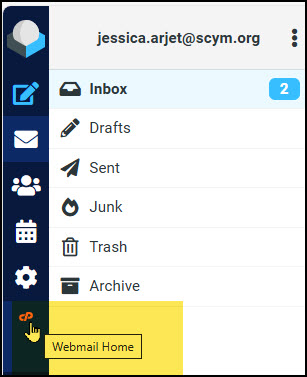
If you are in the RoundCube inbox screen, switch to WebMail home, using the icon in the right side menu:
Click on your username (displayed in the top right corner) to drop down the user menu, and select “Password & Security”.
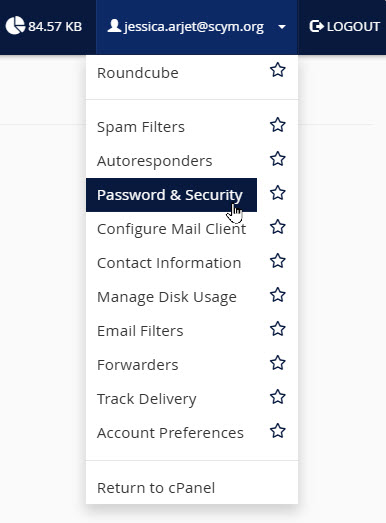
Change your password on the next page. If you have already configured other email clients, such as Outlook, remember to update your password there.